How costs are calculated
All costs in Gatehouse are estimates. Your AI provider's invoice is always the source of truth.
The formula#
For each completed call:
cost = input tokens  × input price  ÷ 1,000,000
     + output tokens × output price ÷ 1,000,000
- Token counts come from the AI provider's own response, so they match what the provider counted.
- Output tokens include any "thinking" (reasoning) tokens the provider reports, because providers bill them as output.
- Prices come from the price table under Settings → Model prices, in US dollars per million tokens.
- Blocked calls cost nothing: they never reach the provider.
- Failed calls are logged at $0. Providers don't normally charge for failed requests.
The cost is recorded when the call happens. Changing a price later doesn't change past calls.
What the estimate does not include#
- Discounts such as prompt caching, batch pricing or committed-use agreements, unless you enter your own discounted prices.
- Taxes, currency conversion, minimum charges or monthly plan fees.
- Streamed answers read by the plugin itself (common for chatbots). Gatehouse sees and can block these calls, but the token counts aren't available, so they're logged without a cost and don't count towards dollar budgets. Hourly limits still count them.
- Calls Gatehouse can't see at all: plugins that send AI requests to their own service, or that bypass WordPress's HTTP functions. See What Gatehouse can and can't see.
Where prices come from#
Gatehouse uses the first of these that has a price for the model:
- Your own prices, from Settings → Model prices.
- Live prices, if Update prices automatically is on.
- Built-in prices, the table that ships with the plugin.
Automatic price updates (recommended)#
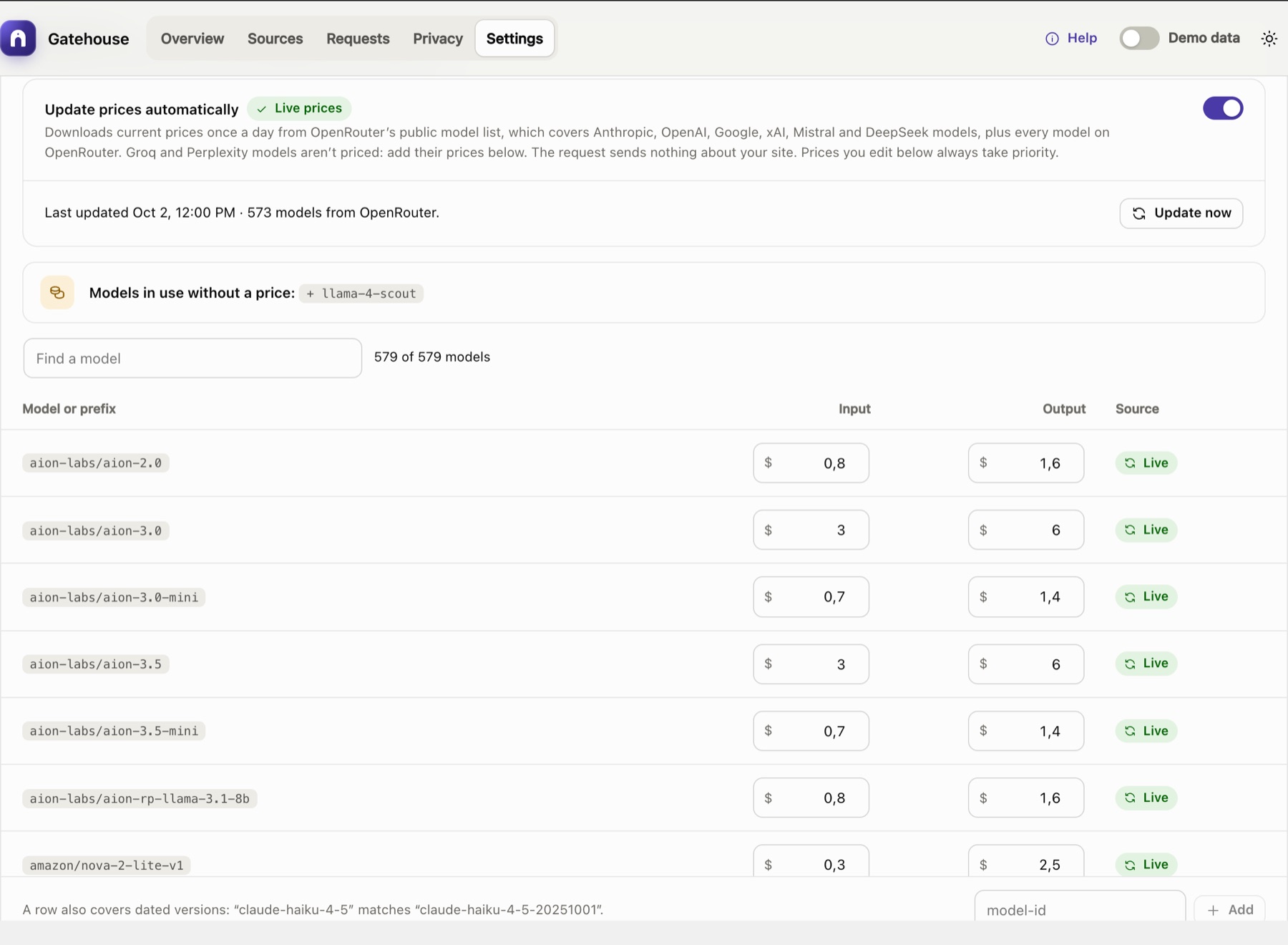
Turn on Update prices automatically. The setup guide offers it, and it's also under Settings → Model prices. Gatehouse then downloads current prices once a day from OpenRouter's public model list. It covers Anthropic, OpenAI, Google, xAI, Mistral and DeepSeek models under their own names, and every model on OpenRouter under OpenRouter's names (for plugins that call OpenRouter directly). Groq and Perplexity models aren't covered; add their prices yourself.
- Nothing about your site is sent. The request is a plain download: no site address, no usage data, no keys.
- Model names are matched for you. The list's names are converted to the names providers use (for example
anthropic/claude-sonnet-5.5→claude-sonnet-5-5). Batch and free variants are ignored. - New models get a price within a day, with no plugin update needed.
- Update now downloads immediately. The status line shows when prices were last updated and how many models were included.
- A failed download never leaves you without prices. The last prices that downloaded successfully stay in use, and the error is shown under Settings → Model prices.
- Turning it off switches back to the built-in prices straight away.
Built-in prices#
When automatic updates are off, Gatehouse uses its built-in table. It is reviewed before each release and changes only when you update the plugin.
- Settings → Model prices says which version supplied the prices and when they were checked.
- The Overview warns you if they are more than four months (120 days) old.
The built-in table is also the fallback for any model the live list doesn't include.
Your own prices#
Providers sometimes change prices between Gatehouse releases, and some businesses have negotiated rates. Enter your own price under Settings → Model prices:
- Your prices always take priority over live and built-in prices.
- They are kept when the plugin updates.
- Reset returns a row to the live or built-in price.
See Settings → Editing prices.
Models without a price#
When a call uses a model that has no price (for example a model from another provider, or a brand-new model while automatic updates are off):
- the call is still logged, with tokens and response time;
- its cost is recorded as $0 and shown as n/a in the Requests log;
- the Overview shows a banner such as "87 calls used models with no price";
- Settings lists the model under Models in use without a price, with a one-click button to add it.
Turn on automatic price updates, or add the model's price yourself. Calls made before the model had a price stay at $0.
Local models (WebLLM)#
AI Provider for WebLLM runs a language model inside the browser (WebGPU): no API key, no cloud and no per-request bill. Gatehouse logs its calls like any other, with the plugin, model and tokens, at a cost of $0, so they never show as unpriced and never use up a budget.
To set it up, and for its limits, see Local AI with WebLLM: download, install, choose a model, turn on the in-browser worker and check it works.
Developers can mark other local providers as free with the gatehouse_local_providers filter.
Forecasts#
The month-end forecast answers: if things carry on like the last week, where will spending end up this month?
forecast = spend so far this month
         + (spend in the last 7 days ÷ 7) × days left in the month
- It is worked out for the whole site and for each source.
- A paused source's forecast is simply what it has already spent, because it makes no more calls.
- A source is On pace to exceed when its forecast is above its budget while its spend is still below it.
Early in a month the forecast relies mostly on last week's pace, so it is meaningful even on the 1st.
Budgets and months#
- Months follow your site's timezone (Settings → General).
- Month-to-date spend is kept as a running total, so budget checks stay fast however many calls you log.
- The total is not affected by request-history pruning. It is reset when the month changes or when you clear the request log.
Still stuck? Check Troubleshooting and the FAQ, or ask on the support forum. Inside WordPress, click Help at the top right of Gatehouse.