Support your customers' WordPress sites. Without the back-and-forth.
Customers open tickets from their own dashboard with everything you'd ask for already attached. You log in with one click, no passwords, under rules you set. Every change you make is logged for them.
Free and open source · Unlimited sites and tickets · WordPress 6.5+ · PHP 7.4+ · Coming soon to WordPress.org
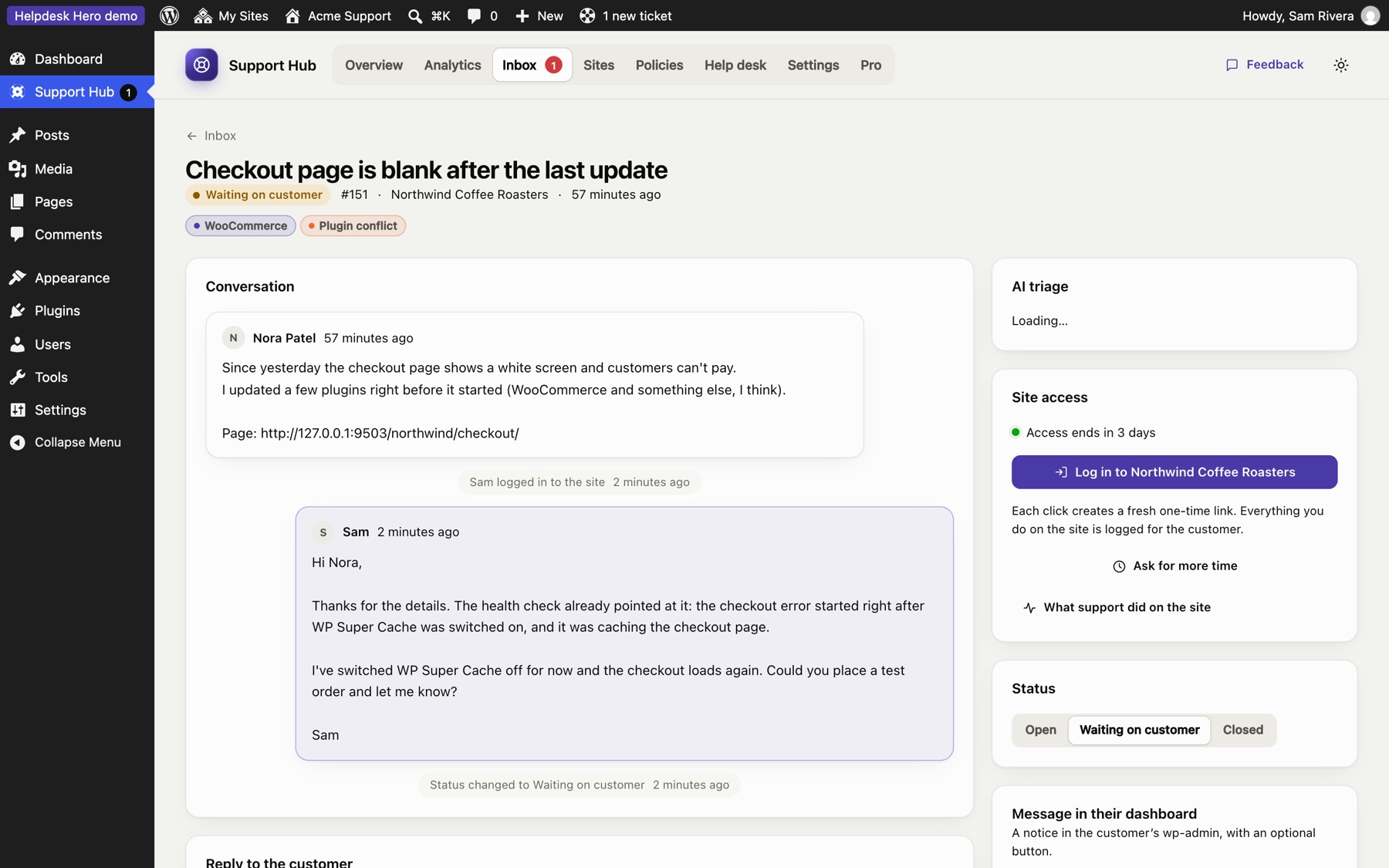
Every WordPress ticket starts the same way
"Which version are you on? Which plugins? Can you send a screenshot? Can I have a login?" Three emails later, you can start.
Versions, plugins, errors and "what changed?" take a day of emails before anyone can look at the actual problem.
Shared admin passwords get forwarded, reused and forgotten. Nobody knows when access should end.
Once support logs in, the customer has no idea what was changed, and trust suffers when something breaks later.
One hub for your team. A help center on every customer site.
Install the free hub on your site, and give each customer a connection code for the free customer plugin.
You send a code
Create a connection code in the hub and choose the rules for that customer.
They open a ticket
From their dashboard, with versions, plugins, errors and recent changes attached, and a health check.
DIAGNOSTICSYou log in
One click, a one-time link, a temporary account that ends on its own. No passwords.
ACCESSYou fix and reply
From the hub. The customer sees your reply in their dashboard and by email.
They see everything
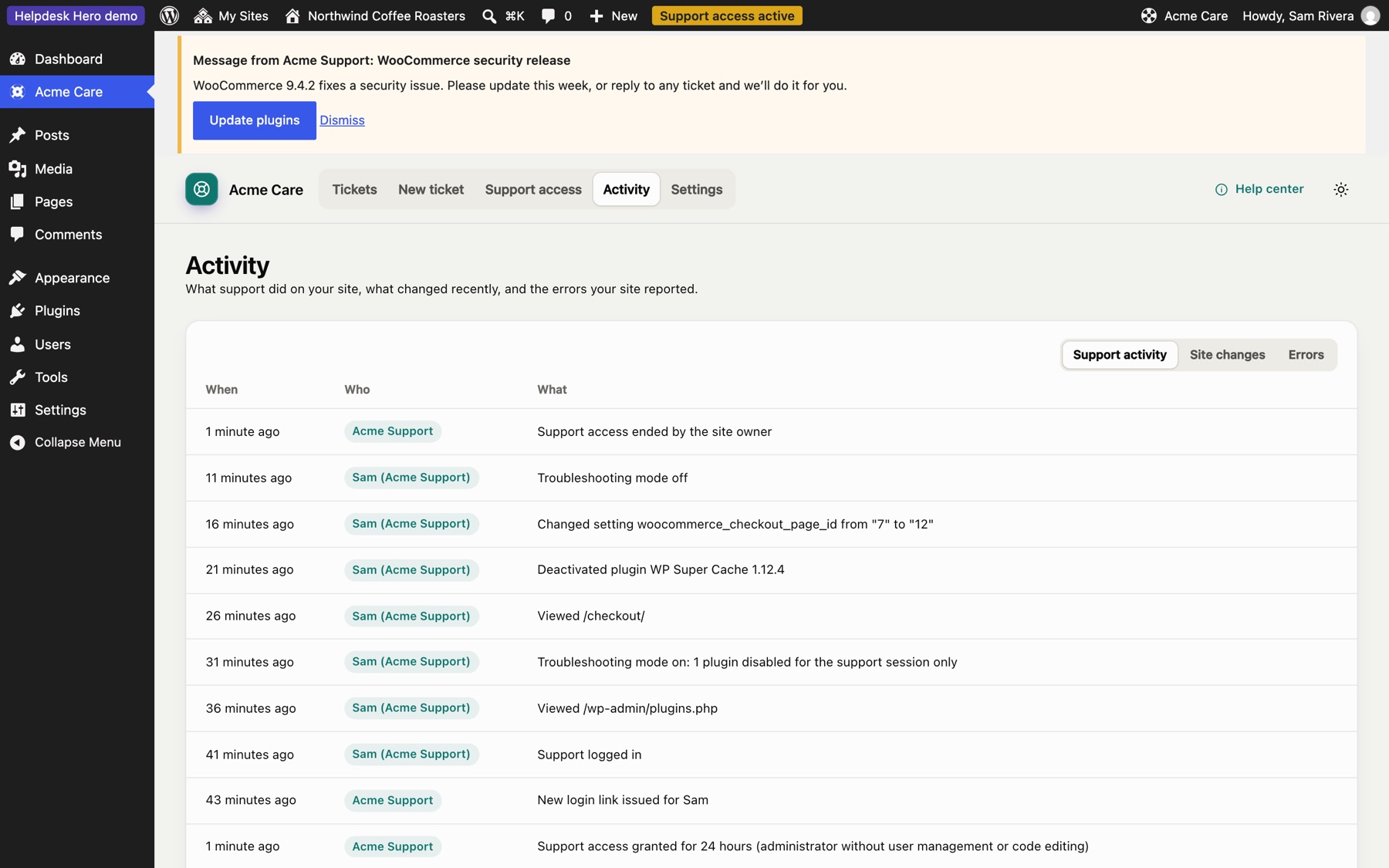
Every page you opened and setting you changed is listed for the customer.
TRUST
Everything a support team needs. Free.
No ticket limits, no site limits, no locked features. Pro adds integrations and reporting for teams who want them.
Start with the cause, not with questions
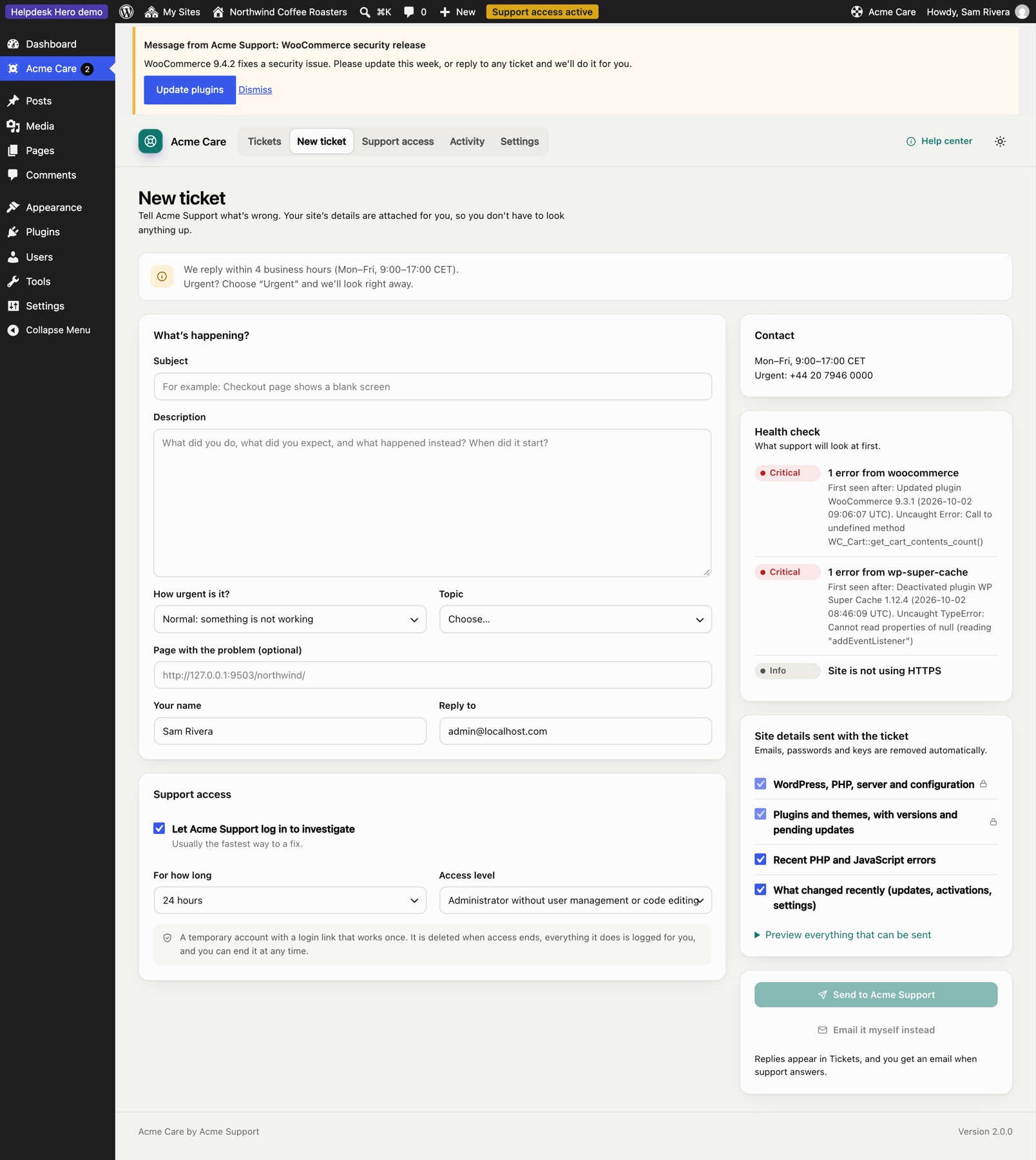
Every ticket arrives with the site's WordPress, PHP and server details, plugins and theme with versions, recent PHP and JavaScript errors, and what changed recently.
- A health check flags conflicts, duplicate plugins and errors that started after an update
- Recurring issues across all your customers, on one chart
- Passwords and keys removed before anything leaves the site
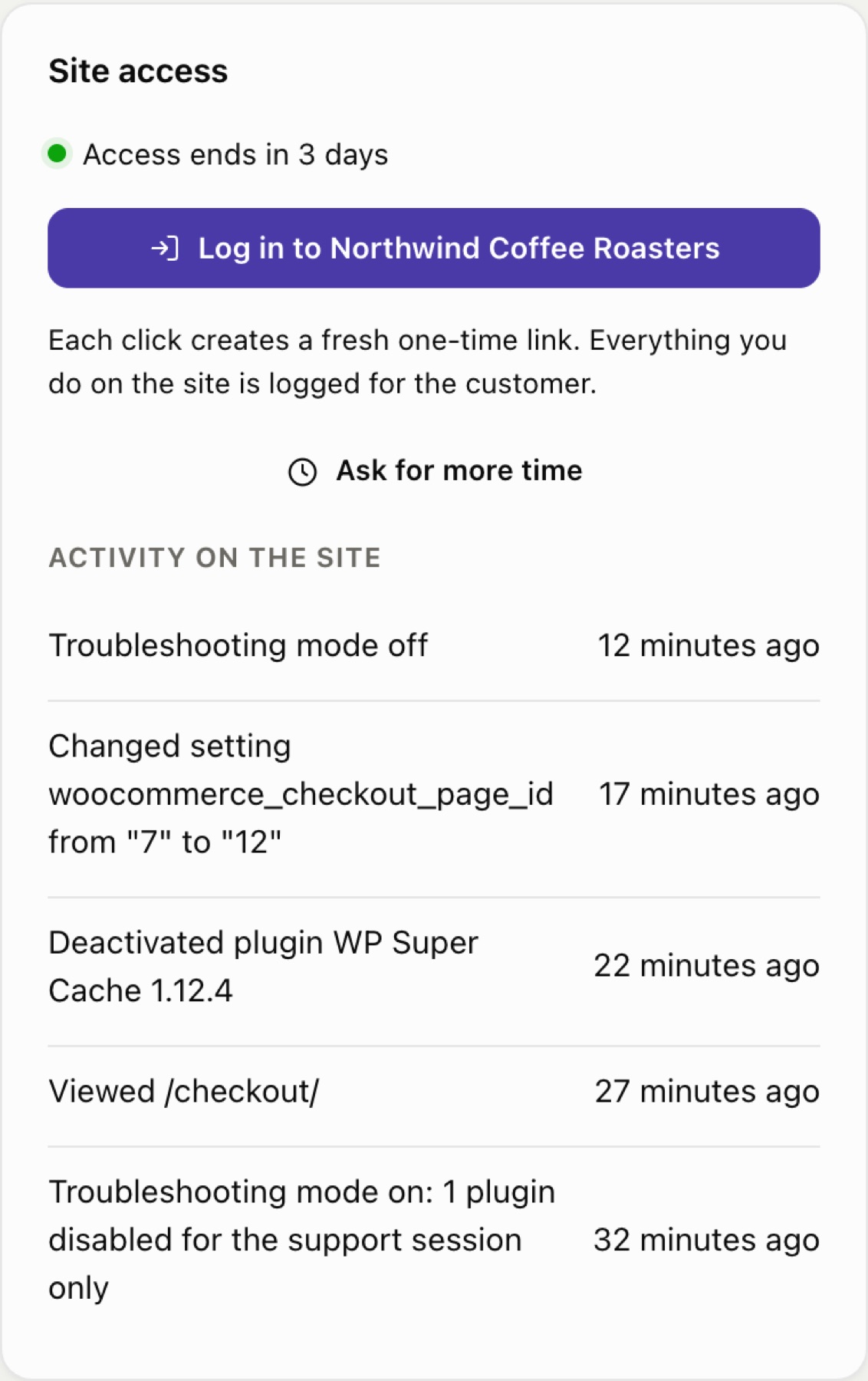
One click, and you're in
When the customer allows it, their site creates a temporary account for your team. Each login is a fresh one-time link. Access ends on its own, or when the ticket closes.
- A safe default role: an administrator who can't manage users or edit code
- Ask for more time; the customer approves, or it's automatic
- Troubleshooting mode: switch plugins off for your session only
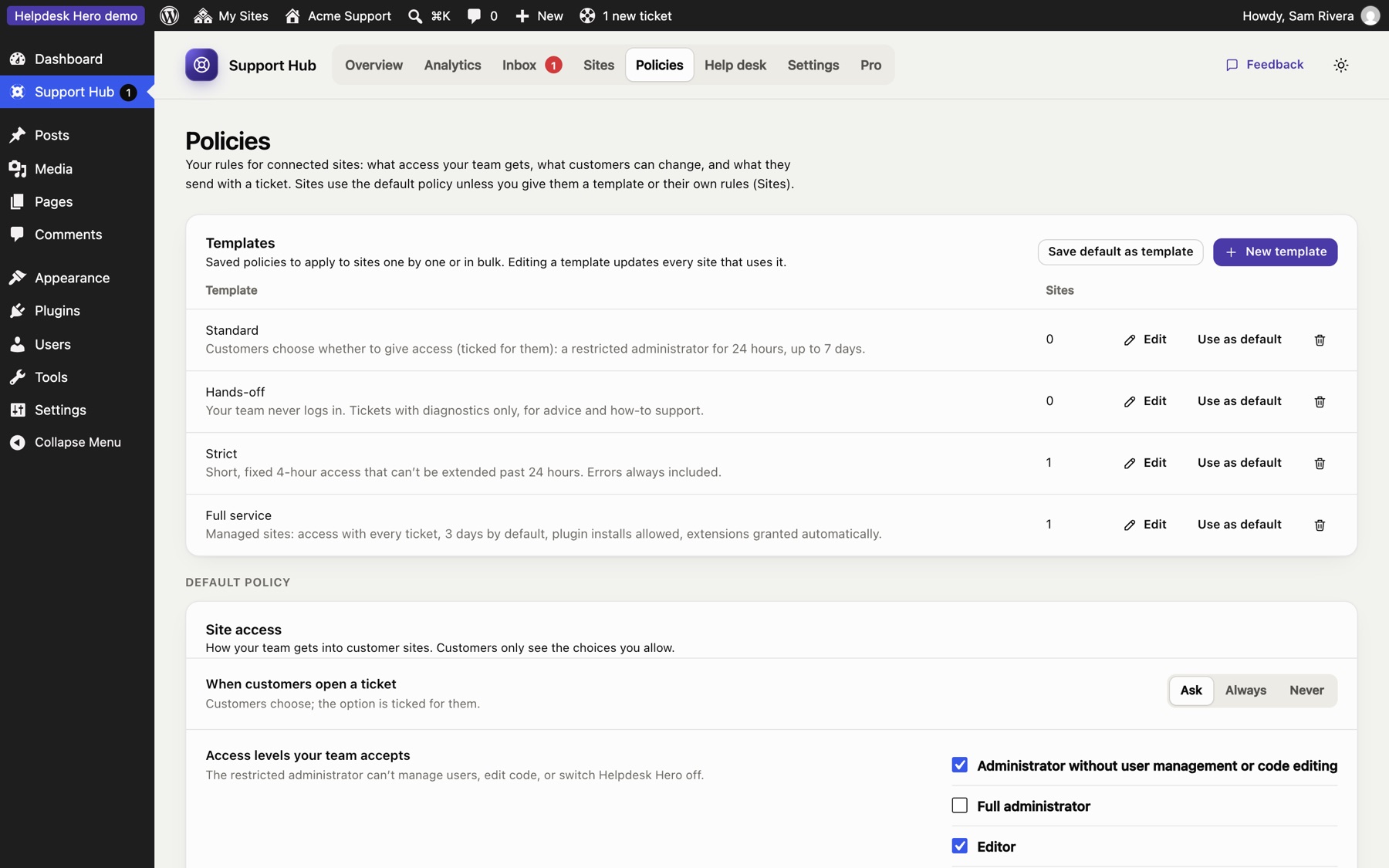
Support policies and templates
Decide what access your team gets, for how long, what customers may change and what a ticket must include. Save policies as templates and apply them to one site or a hundred.
- Standard, Hands-off, Strict and Full service templates to start from
- Enforced on both sides: customers see only the options you allow
- Change a template and every site using it updates
Customers see everything you do
Pages you opened, settings you changed with old and new values, plugins you switched off: all listed on the customer's own site. They can end your access at any moment.
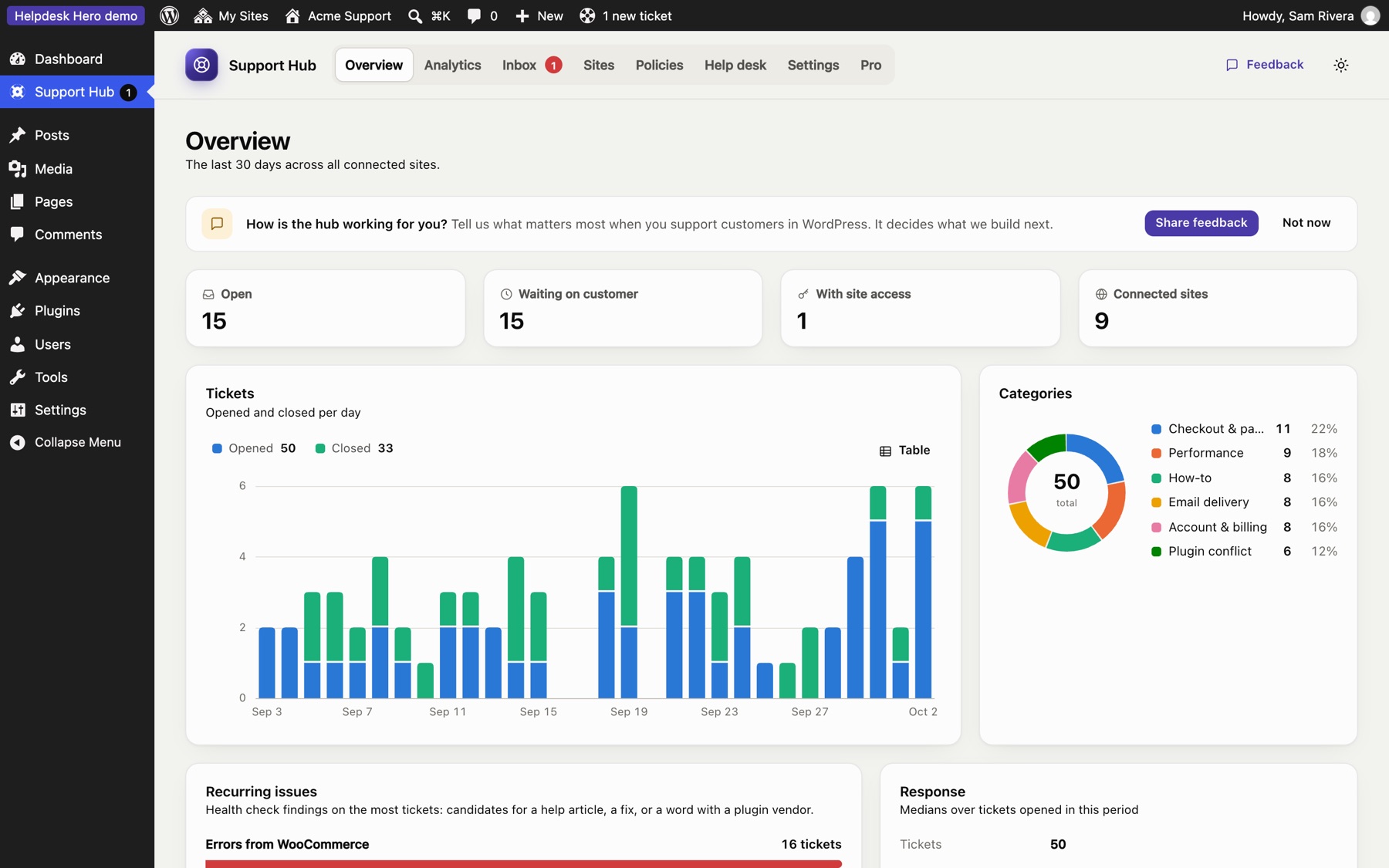
Statistics that tell you what to fix
Tickets per day, categories, recurring issues and response times across every site. Pro adds per-site analytics, ratings, busiest sites and PDF reports for clients.
Tags
Sort tickets with coloured tags. Customers see them too, so they know where things stand.
Emailed tickets
Customers can email a ticket themselves, confirm they sent it, and it still lands in your hub with diagnostics.
Dashboard messages
Leave a notice in a customer's dashboard, with a button: "Please update WooCommerce this week".
Two-minute setup
A step-by-step guide opens when you activate the hub: your team, your policy, your first site.
WP-CLI and hooks
Add your own diagnostics and known conflicts, or extend the hub's screens. Developer docs.
Backup and restore
Your whole hub in one file: sites, tickets and settings. Reinstall or move, restore, and sites reconnect on their own.
For teams that live in a help desk
Pro is an add-on for the hub. Your customers don't need anything extra.
Ratings and reviews
Customers rate support when a ticket closes. See the comments on the ticket and the trend in Analytics.
More →Analytics and PDF reports
Any date range, per site, ratings and busiest sites, and a monthly report for each client.
More →White label
Your name, logo, colour and links on every customer's help center: "Acme Care", not "Get Help".
More →AI triage
A brief on every new ticket: the likely cause, suspects and first steps, plus reply drafts.
More →Supporters
Choose who replies and logs in, under the name customers see. Each gets their own account on the customer's site.
More →AI that runs in your browser. No account, no bill.
Helpdesk Hero's AI features work with any AI provider in WordPress, and we recommend one that keeps everything on your side: AI Provider for WebLLM runs a language model on your own computer through WebGPU. No API key, no per-request cost, and nothing is sent to an AI company.
Private by design
Prompts and answers stay in your browser and your site. Ideal for tickets full of customer details.
Free to run
The model downloads once and runs on your graphics chip. There's no usage to pay for.
Set up in five minutes
Download, install, choose a model and check it works, step by step.
Read the guide →AI Provider for WebLLM is free and open source (GPL), created by Joost de Valk and published by Progress Planner, built on WebLLM by MLC AI. Project on GitHub.
Free to run. Pro when you grow.
The free plugins do everything above, for as many sites and tickets as you have.
Helpdesk Hero
The hub and the customer plugin. Complete, with no limits.
- Unlimited sites, tickets and team members
- Diagnostics and health checks
- One-click access without passwords
- Support policies and templates
- Activity log and troubleshooting mode
- Tags, statistics and emailed tickets
Pro · yearly
For teams that live in a help desk, or report to clients.
- Advanced analytics and PDF reports
- White label for customers' help centers
- Customer ratings and reviews
- AI triage and reply drafts
- Supporters with their own names and accounts
Pro · monthly
The same Pro features, month by month.
- Everything in Pro
- Cancel any time
Prices in US dollars. Pro is an add-on for the hub; your customers never pay or install anything extra. If your license ends, Pro features switch off and the free hub keeps working.
Questions, answered
Who is it for?
Anyone who supports other people's WordPress sites: agencies and freelancers with care plans, plugin and theme vendors, hosts and in-house teams.
What do my customers install?
The free Helpdesk Hero plugin. They paste the connection code you send them, and their help center follows your rules. A guide you can send them.
Can customers connect to my hub without permission?
No. Each connection code is created by you, works once and expires after 7 days. You can disconnect a site at any time.
Is there a server or account in the middle?
No. Your hub and your customers' sites talk directly, with signed requests. We never see your tickets.
Do I need Help Scout or Zendesk?
No. The hub has its own inbox and emails your team. Help Scout and Zendesk connections are coming soon in Pro.
Is it safe to give support access this way?
Safer than a shared password: no password exists, each link works once, access ends on its own, the default role can't manage users or edit code, and everything is logged for the customer. Security details.
See it in action
The live demo opens a support hub and a customer site in your browser, with example tickets. Nothing to install.